


Semrush Explained: 5 Standout SEO Features & A Practical Workflow

Most SEO problems are not “mysteries.” They are blind spots.
You publish content but do not know which keywords are realistic. You build pages but miss technical issues that block crawling. You earn links but can’t tell which ones actually matter. You look at competitors and feel they’re winning—without understanding why.
That is what makes platforms like Semrush so valuable. Semrush is a unified suite for SEO and digital marketing intelligence: keyword discovery, technical auditing, competitive research, backlink analysis, and ongoing rank tracking. Instead of stitching together five separate tools, you can run one connected workflow that moves from insights to execution.
If you want to explore the toolkit directly, start here: Semrush.

What Semrush Is (And Who It’s For)
Semrush is best described as a decision platform for search growth. It helps you make choices with evidence rather than instinct:
- SEO specialists use it to research keywords, audit sites, analyze links, and track rankings.
- Content teams use it to build topic plans, identify search intent, and measure performance over time.
- Marketers use it to understand competitors, estimate traffic opportunities, and prioritize channels.
- Agencies rely on it for scalable reporting and repeatable workflows across clients.
In practical terms, Semrush helps you answer “what to do next” in SEO. That is the real value: clearer priorities and faster execution.
How Semrush Supports SEO Workflows
Semrush becomes useful when you treat it like a system, not a set of isolated reports. A simple way to think about it is the SEO loop:
- Research demand (keywords, intent, SERP patterns)
- Identify obstacles (technical errors, structure issues)
- Study competition (what wins in your niche)
- Build authority (links, mentions, topical depth)
- Measure and iterate (rank trends and content impact)
Semrush supports this loop end-to-end, which is why it’s often chosen as a “home base” tool. If you want a single platform to unify your SEO workflow, Semrush is designed for exactly that.
The 5 Best Semrush Features for Real-World SEO
Semrush includes many modules, but a handful are responsible for most of the practical value. These five features are the ones teams return to week after week.
1) Keyword Research That Helps You Choose Wisely
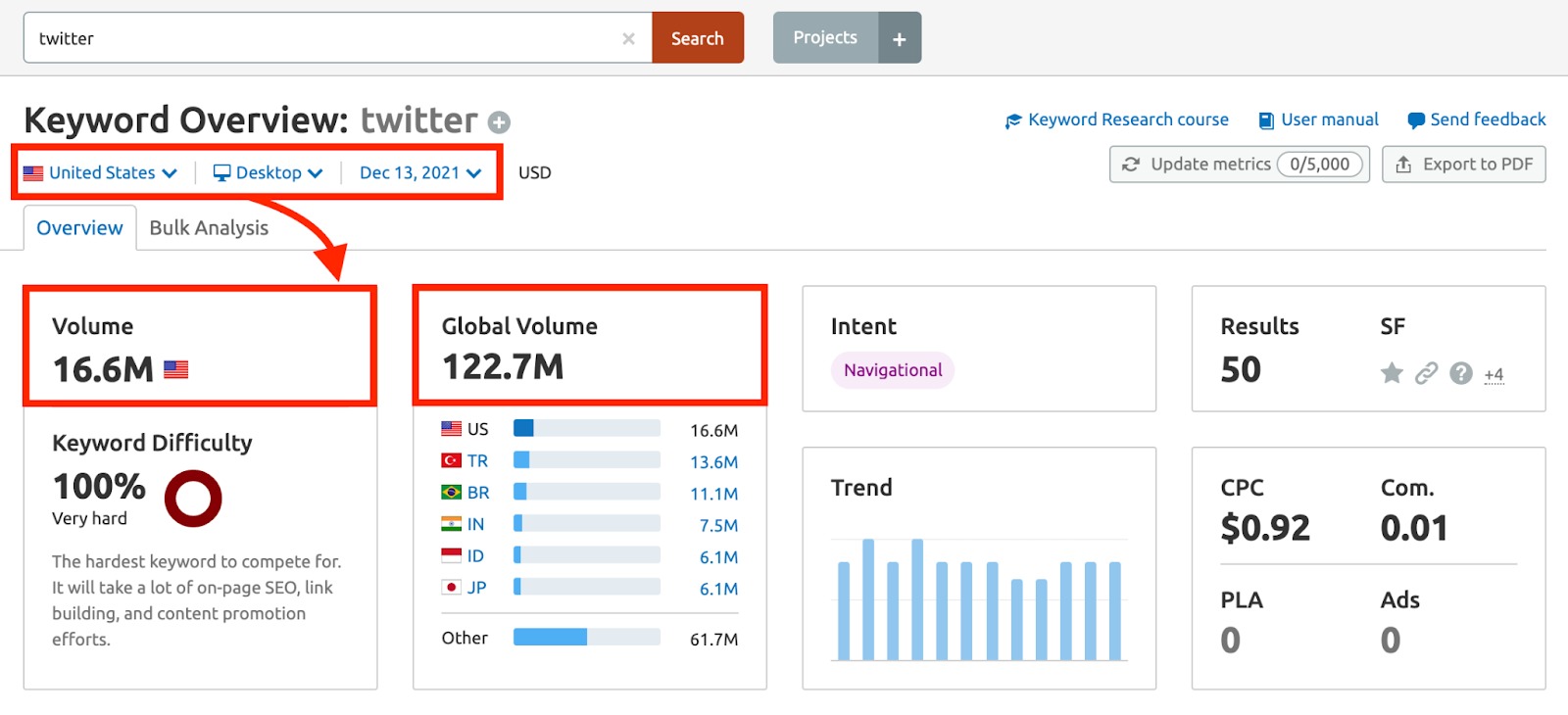
“High volume” is not the same as “high opportunity.” Keyword selection should consider difficulty, intent, SERP layout, and how searchers behave. Semrush supports this with a set of keyword tools that work together:
- Keyword Overview: a fast snapshot of demand, trend direction, competitiveness, and intent cues.
- Keyword Magic Tool: a discovery engine for related terms, long-tail variations, and question keywords.
- Keyword Strategy Builder / clustering: a way to group terms into topic clusters for content architecture.
When you use these tools properly, you stop chasing random keywords and start building structured topical coverage.
2) Site Audit for Technical SEO and Site Health
Technical SEO is rarely glamorous, but it is often where performance gets stuck. A site can have great content and still underperform if search engines face friction while crawling or indexing.
The Site Audit module helps you detect patterns, not just isolated errors. Common areas include:
- Crawl issues: broken links, redirect chains, server errors, blocked resources.
- Indexability risks: pages that may be duplicated, thin, or improperly configured.
- Internal linking gaps: orphan pages and weak navigation signals.
- Performance concerns: pages that may load slowly and reduce engagement.
- HTTPS and security checks: trust-related setup problems.
A reliable habit is to run a Site Audit monthly and treat the results like a backlog. SEO becomes calmer when you remove recurring technical debt.
3) Competitor Research That Reveals How They Win
Competitor analysis is useful when it tells you what is working—not when it merely lists their keywords. Semrush competitor modules can help you see the structure behind their growth: which pages drive traffic, which topics dominate, and how visibility changes.
- Domain Overview: a quick dashboard-level view of authority signals, traffic estimates, and keyword footprint.
- Organic Research: a deeper look at ranking keywords, top pages, and movement over time.
- Traffic Analytics: directional insights on visits, engagement, and device distribution.
Used correctly, competitor research becomes a planning tool. It shows where the market is crowded, where it is open, and where you can differentiate with better content or positioning.
4) Backlink Analytics + Backlink Gap for Authority Building
Links remain important, but quality and relevance beat volume. Semrush helps you understand link profiles with less guesswork by focusing on “where authority comes from” and “what you’re missing.”
Key modules include:
- Backlink Analytics: overview of referring domains, new/lost links, anchor distribution, and link sources.
- Backlink Gap: a comparison tool that highlights domains linking to competitors but not to you.
- Backlink Audit: helps identify suspicious links and organize review workflows.
- Link Building Tool: outreach pipeline management for prospecting and follow-up.
The outcome you want is a clearer strategy: pursue the same reputable sources your competitors earn, then expand into adjacent publications and partnerships that fit your niche.
5) Position Tracking for Trend-Based Reporting
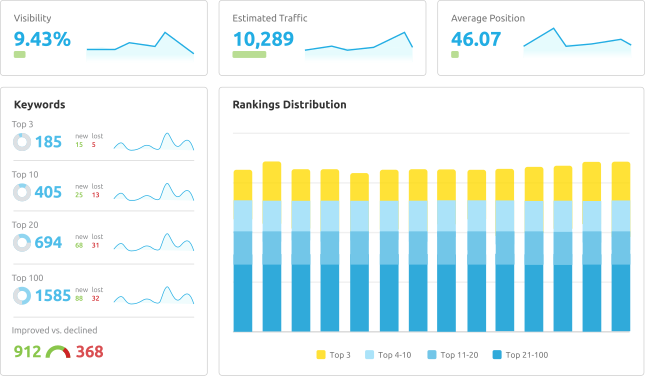
SEO performance is noisy on a daily basis. Rankings move, SERPs change, and algorithm updates can temporarily distort results. Position Tracking becomes valuable when you focus on trends and segments rather than single keywords.
Position Tracking is commonly used for:
- monitoring keyword clusters by category or intent
- tracking location-based ranking differences
- spotting gradual improvement after technical fixes or content refreshes
- benchmarking performance against competitors over time
When combined with audits and competitor research, rank tracking becomes a feedback loop: you change something, then confirm whether the market responds.
A Practical Semrush Routine for Busy Teams
If you only have a few hours each week, you need a workflow that keeps you moving forward without overanalyzing. Here is a practical routine many teams can maintain:
- Weekly: review Position Tracking trends and identify pages losing traction.
- Weekly: run competitor checks on one category to spot new content patterns.
- Biweekly: expand one topic cluster using Keyword Magic Tool (questions + long-tail).
- Monthly: run Site Audit and address the highest-impact technical items.
- Monthly: run Backlink Gap and build a short outreach list for link opportunities.
This routine creates compounding progress: stronger technical foundations, smarter content planning, better authority signals, and clearer measurement.
If you want to centralize this workflow into a single platform, you can start with Semrush.
Semrush vs Ahrefs: A Clear Way to Decide
Semrush and Ahrefs are both respected. The choice is often about workflow preference:
| If you need… | Semrush tends to fit | Ahrefs tends to fit |
|---|---|---|
| An all-in-one SEO + marketing workspace | Strong (keywords, audits, competitive intel, reporting) | Possible, but more SEO-focused |
| Keyword planning with multiple tools and clustering | Strong tool breadth for planning workflows | Strong analysis, typically simpler planning approach |
| Deep backlink exploration as your primary activity | Strong, plus audits and outreach workflows | Often preferred for deep link exploration |
| Competitor visibility across organic and paid contexts | Often stronger for PPC + competitor perspective | Typically more organic-centric |
If your goal is to operate SEO with a connected workflow—research, auditing, competitive strategy, links, and tracking—Semrush is usually a practical choice.
Conclusion: Semrush Is Most Valuable When You Use It as a System
Semrush is not “one feature.” It is a platform that becomes more useful as you connect modules. Keyword research helps you choose targets, audits remove friction, competitor analysis clarifies strategy, backlinks build authority, and position tracking tells you whether your decisions worked.
When you put those pieces together, SEO turns from reactive work into a controlled growth process.
If you want to explore Semrush for your own website or clients, start here: Semrush.
FAQ
Is Semrush beginner-friendly?
Yes. Beginners usually start with Keyword Overview, Keyword Magic Tool, and Site Audit, then expand into competitor research and backlink workflows once the basics are clear.
Which Semrush tool is best for content planning?
Keyword Magic Tool is a strong starting point for discovering clusters and questions, while clustering or strategy-building features help turn keywords into a structured topic plan.
How often should I run a Site Audit?
Monthly is a practical baseline for most sites. If you publish frequently or make many technical changes, you may benefit from running it more often.
Does Semrush replace Google Search Console?
No. Search Console reports what Google sees for your site, while Semrush provides broader market intelligence, competitor context, and workflow tools for research, audits, and tracking.
We only recommend tools we've tested and trust. This post may include affiliate links, meaning we may earn a commission if you choose to purchase - at no extra cost to you.


