


A Brand-Friendly Playbook for Social Proof and Consistent Posting

One of the most frustrating moments in ecommerce marketing is watching a customer create the perfect sales asset for you—without you asking. They film an unboxing, rave about the results, or casually show your product in their daily routine, and the video performs well. The only catch is that the content lives on their page, not yours.
You could comment “Thanks!” and hope people click through. You could download the video and upload it yourself, but that can feel awkward and may remove context or credit. You could ask for permission to use it in ads, but that takes time. TikTok’s repost feature offers a simple middle path: you can amplify someone else’s public video to your followers while keeping the original creator attached to the post.

TikTok Reposts Explained: What They Are (and What They Aren’t)
A TikTok repost is a built-in sharing action that lets you recommend someone else’s public video to your followers. Instead of re-uploading the clip as if it were yours, reposting keeps the original post intact and credited to the creator.
For brands, the value is simple: reposting is closer to curation than content creation. You’re saying, “This is worth watching,” and you’re attaching your account’s endorsement to the video.
To avoid confusion, it helps to understand what a repost does not do. It does not turn the video into your original upload, and it does not remove the creator’s ownership. It also differs from downloading and re-posting, which can create credit issues and may weaken trust with creators.
In practical terms, reposting helps you keep your account active and relevant while highlighting content that supports your brand narrative—especially customer-made proof that your product works.
Why Brands Use Reposts: The Strategic Benefits
Reposts are often treated as a small feature, but for ecommerce accounts they function like a content multiplier. Instead of relying solely on brand-made videos, you can mix in community content and creator perspectives to keep your feed varied.
Benefit 1: Consistency without constant filming
TikTok rewards accounts that show up regularly. The challenge is that filming every day is hard when you also manage inventory, customer support, and marketing. Reposts help fill gaps so you maintain momentum during busy weeks, launches, or fulfillment spikes.
Benefit 2: Social proof that feels authentic
Reposts are particularly powerful when they spotlight user-generated content (UGC). UGC tends to convert because it looks like real life, not like advertising. A repost can highlight:
- unboxings and first impressions
- before/after transformations
- product hacks and use-case demos
- creator reviews and honest opinions
- customer stories that build instant trust
For many brands, social proof is the fastest way to reduce skepticism. It turns “I’m not sure” into “Other people like me are using this.”
Benefit 3: Relationship building with creators
When you repost a creator’s video, you’re giving them visibility and signaling appreciation. This is one of the easiest ways to build goodwill that can later lead to collaborations, whitelisting for ads, affiliate partnerships, or repeat creator content.
Benefit 4: A clearer read on what your audience prefers
Reposts can function like market research. If reposted videos outperform your originals, that data suggests what hooks, formats, or angles your audience responds to. You can then create your own original video that mirrors the winning structure while preserving your brand voice.
How to Repost on TikTok: Step-by-Step Instructions
The mechanics of reposting are simple, but the choice of what to repost matters. Use a repeatable process so reposting improves your account rather than cluttering it.

Step 1: Pick a video that supports a clear goal
Before you repost, decide why the video deserves your endorsement. Strong reposts usually do at least one of the following:
- Build trust: genuine reviews, honest reactions, or product outcomes
- Teach quickly: short tutorials, tips, or usage ideas
- Inspire: styling, routines, “day in the life,” or creative use cases
- Strengthen community: relatable niche humor or customer stories
Where to find repost-worthy videos:
- your For You page when it’s aligned with your niche
- hashtags that match your category (avoid only broad tags)
- mentions, tagged posts, and creator content about your product
- comments on your brand videos where people often link related content
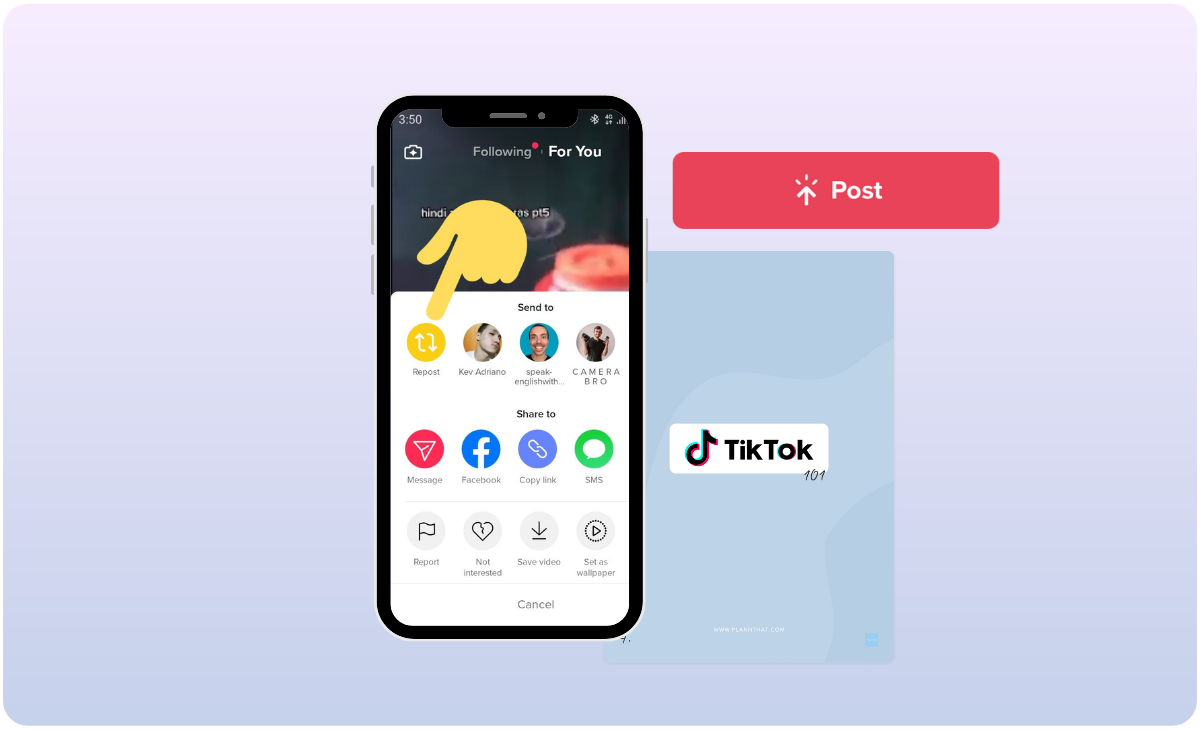
Step 2: Open the video and tap the Share arrow
On the video screen, tap the Share icon (the arrow). TikTok will show you a menu with quick actions.
Step 3: Tap “Repost”
Select Repost. TikTok will share it to your followers as a video you recommended. The original creator stays credited, and you don’t need to download or edit anything.
For brands, this is the cleanest way to amplify customer proof while maintaining creator ownership and transparency.
How to Remove a Repost (Undo Repost)
Sometimes reposts age poorly. A video might become controversial, the context might change, or you might realize it doesn’t match your brand tone. Removing a repost is usually quick.
Step 1: Go to your profile
Open TikTok and navigate to your profile page.
Step 2: Find the reposted video list
Depending on your TikTok version, reposted videos may appear under a reposts section or tab.
Step 3: Open the reposted video
Select the video you want to remove from your reposts.
Step 4: Use the Share menu and undo the repost
Tap Share again and choose the option that removes or undoes the repost. This does not delete the original creator’s video—it only removes your amplification of it.
Repost vs Duet vs Stitch: Choosing the Right Format
Reposts are not always the best choice. TikTok gives you multiple ways to share or respond to content, and each format serves a different brand purpose.
| Format | Best For | Why It Works | Common Mistake |
|---|---|---|---|
| Repost | Amplifying social proof | Fast, credits the creator, keeps your account active | Reposting random viral content that doesn’t fit your niche |
| Duet | Reaction + personality | You appear beside the original video and add presence | Adding no value beyond a forced reaction |
| Stitch | Education + response | You borrow a clip then extend it with your message | Weak scripting that feels disconnected from the clip |
If you want a simple decision rule: use reposts for amplification, duets for human presence, and stitches when your goal is teaching or correcting.
Best Practices: Reposting Without Making Your Account Look Lazy
Reposting is helpful, but only if it looks intentional. If your feed turns into a stream of unrelated reposts, you lose identity and reduce trust. These practices keep reposting strategic.
Practice 1: Repost content that matches your brand point of view
Every brand has a story it wants people to believe. Strong reposts support that story. For example, a premium brand benefits from reposts that highlight quality, craftsmanship, and results. A value brand benefits from reposts that emphasize practicality, comparison, and real-life use.
Practice 2: Favor “conversion-friendly” reposts over random virality
Not all viral videos are useful for business. Viral content can attract the wrong audience—people who follow for entertainment but never buy. Reposts should build trust, demonstrate usage, or attract the kind of follower who aligns with your niche.
Practice 3: Keep a healthy ratio of original content
Reposts should support your account, not replace your voice. A simple balance that works for many brands is:
- original posts that define your voice and product story
- reposts that amplify customer proof and community moments
- duets/stitches that add commentary and authority
Practice 4: Ask for permission when the content is personal
Reposting keeps credit intact, but if a video includes sensitive health stories, emotional moments, or private context, it’s good etiquette to ask first. Respect protects relationships and reduces brand risk.
Practice 5: Use reposts as inputs for your next original videos
If a repost performs well, treat it like a signal. Create your own follow-up content that builds on it, such as:
- answering the top questions in comments
- breaking down the product feature being highlighted
- showing a behind-the-scenes demonstration
- creating a “beginner version” tutorial
This turns reposting into a content engine rather than a shortcut.
A Simple Repost System Brands Can Run Weekly
Brands struggle with TikTok when posting is improvised. A lightweight system reduces stress and improves consistency without requiring a big team.
Weekly posting template
- 2 original videos: education, product usage, founder POV, behind-the-scenes
- 2 reposts: reviews, UGC, creator shoutouts, customer stories
- 1 duet or stitch: commentary, answers, reaction, myth-busting
Collection and selection workflow
- save potential reposts into a TikTok collection
- each week, pick the best ones based on clarity and brand fit
- avoid reposting content that conflicts with your positioning or tone
Quick quality filter before reposting
- Would we be proud if a new customer saw this first?
- Does it build trust or demonstrate a real use case?
- Does it attract the right audience for our product?
This small structure keeps your reposts coherent and your account identity strong.
FAQ: TikTok Reposts for Brands
Do reposts show up on your profile?
In many TikTok versions, reposts appear in a dedicated section or tab on your profile. The interface can change over time, so you may need to update the app or explore profile tabs to find them.
Why can’t I see the repost button?
The repost option may vary based on app version, region, or creator settings. If you don’t see it, try updating TikTok and testing other videos. Some content may not be eligible for reposting.
Is reposting better than re-uploading customer videos?
Reposting is usually safer because the creator remains credited and the original context stays intact. Re-uploading can create attribution issues and may feel like content theft unless you have explicit permission.
Can reposts help ecommerce sales?
Reposts can support sales by reducing skepticism. When customers see authentic reviews and real use cases, trust builds faster. Reposts work best when combined with original content that explains benefits and answers common questions.
How often should a brand repost?
There is no single perfect frequency, but many brands find success by reposting one to three times per week. If your account reposts too often without originals, your brand voice can disappear.
Conclusion: Reposts Work Best When They Feel Like Curation
TikTok reposts are not just a convenience feature. For brands, they are a practical way to amplify real-world proof, keep posting consistent, and build relationships with creators—without forcing your team to film nonstop.
The key is to repost with intention. Choose videos that reinforce your positioning, show the product in real contexts, and build the kind of trust that makes viewers comfortable buying. Combine reposts with originals and occasional duets or stitches, and reposting becomes a sustainable growth system rather than a lazy shortcut.
If you want to grow with TikTok for Business and turn reposts into a real marketing asset, pair consistent curation with conversion-focused original videos, strong trust signals, thoughtful follow-ups, and disciplined testing so your content strategy scales without burning out your team.
We only recommend tools we've tested and trust. This post may include affiliate links, meaning we may earn a commission if you choose to purchase - at no extra cost to you.